
Verifiable Parental Consent
Under the Digital Personal Data Protection Act, 2023, a child is anyone under 18. Before you process a child's personal data, you need the parent's verifiable consent.
DPDP Act 2023 · Section 9(1)
The Data Fiduciary shall, before processing any personal data of a child, obtain verifiable consent of the parent of such child.
Rule 10 of the DPDP Rules, 2025 says how. You must check that the person who says they are the parent is an identifiable adult. You can check against reliable identity and age details you already hold. You can also use details the person provides, or a virtual token issued by an authorised entity. A DigiLocker service provider is one such entity.
Withdrawal, and the Penalties for Getting This Wrong
Withdrawal has its own rule. Section 6(4) gives the parent the right to withdraw at any time, with the ease of doing so being comparable to the ease with which such consent was given
. Part two of this series covers what that looks like in practice.
DPDP Act 2023 · The Schedule, item 3
Breach in observance of additional obligations in relation to children under section 9: may extend to two hundred crore rupees.
That ties with failing to report a data breach for the second-highest cap in the Act. Only a failure of reasonable security safeguards carries more, at ₹250 crore. The figure is a ceiling. Under Section 33(2), the Data Protection Board sets the amount. Among other factors, it looks at the nature, gravity and duration of the breach, the type of data affected, whether the breach repeats, and how quickly and effectively the organisation acted to limit the harm. A clean record of how consent was taken counts in that review.
Rule 10 and the consent obligations come into force in May 2027, eighteen months after the Rules were notified in November 2025.
A Note for Schools
Part A of the Fourth Schedule to the Rules exempts educational institutions from Sections 9(1) and 9(3). The exemption applies only where processing is restricted to tracking and behavioural monitoring for the institution's educational activities, or in the interests of the safety of enrolled children. A transport provider engaged by the school gets a similar exemption, limited to tracking a child's location for safety on the way to and from school. Neither covers everything a school does. Publishing a child's photos on the school website and social media falls outside it. So does sharing data with vendors for unrelated purposes. Map each purpose before you decide where consent is needed.
Giving Consent, Screen by Screen
We ran the whole flow on Scrutora. The school, Kesarwadi Public School, is fictional. The child, Ira Deshpande, is fictional. The parent is a real adult, signing with a real DigiLocker account. Part of the parent's verified name is blurred in the screenshots.
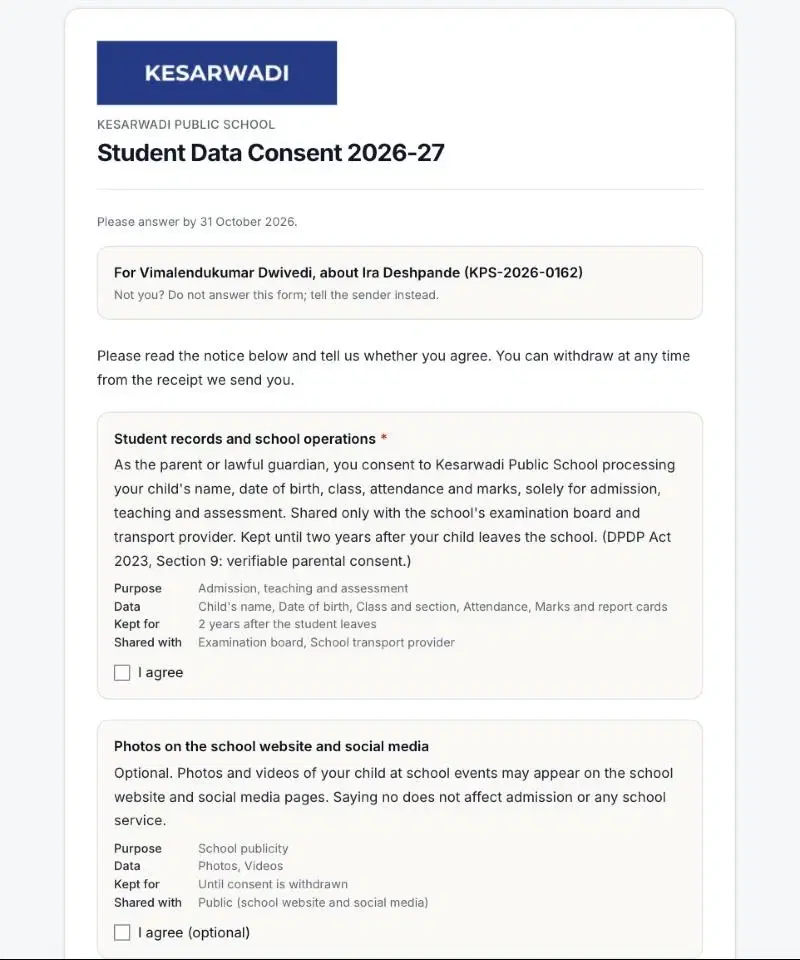
The form asks for consent to two purposes:
- Student records and school operations. Required. Admission, teaching and assessment.
- Photos on the school website and social media. Optional. Saying no changes nothing about admission.
Step 1
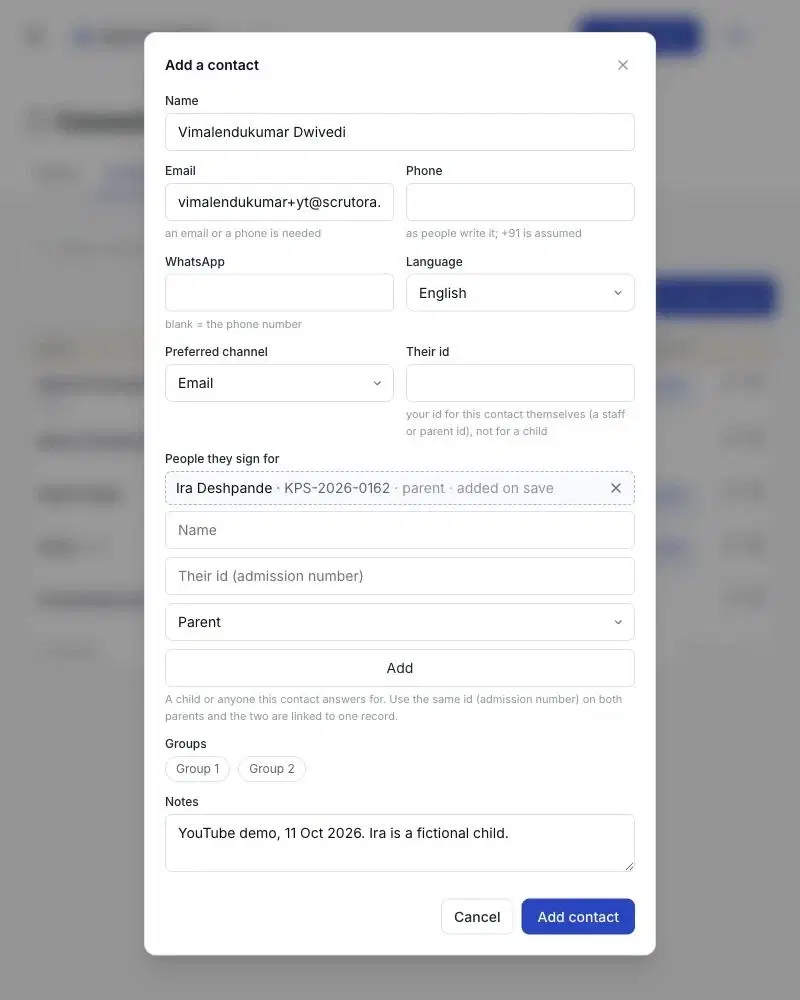
The school adds the parent and links the child
The parent is the contact. The child sits under “People they sign for”, with the admission number. Consent will be recorded about the child and signed by the parent. Both parents can be linked to one child record through the same admission number.
Step 2
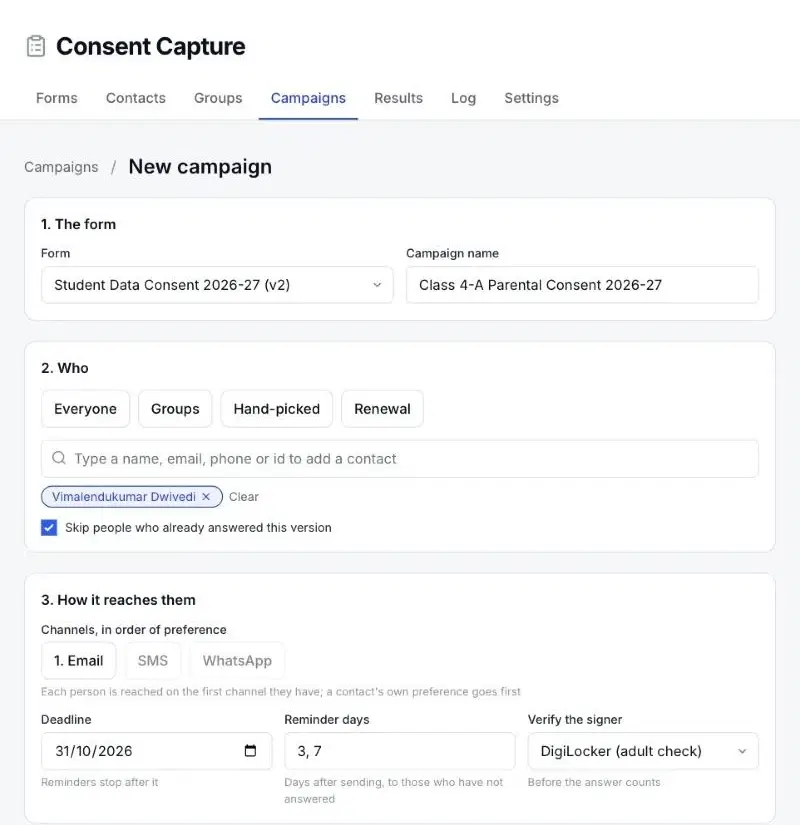
The campaign turns on signer verification
The school picks the form, the recipients and the channel. One setting matters most here. “Verify the signer” is set to DigiLocker (adult check). An answer does not count until that check passes.
Step 3
The parent opens the invite
The form names the parent and the child at the top. Each purpose is a separate tick box. Each one states the purpose, the data, how long it is kept and who it is shared with. Nothing is pre-ticked.
Step 4
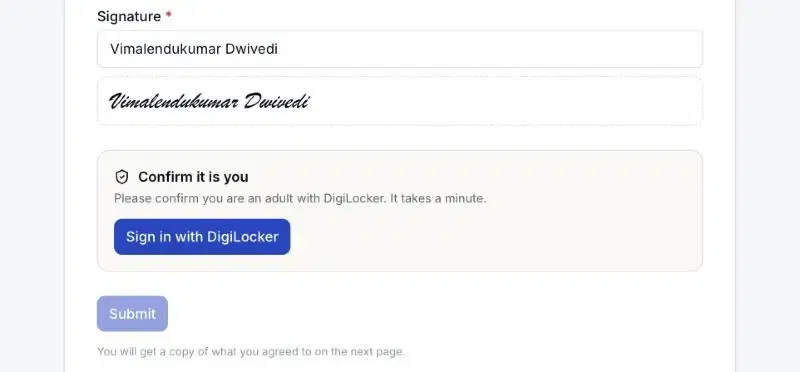
The parent signs. Submit stays locked.
The parent ticks both purposes and types a signature. The Submit button stays disabled. It unlocks only after the DigiLocker check.
Step 5
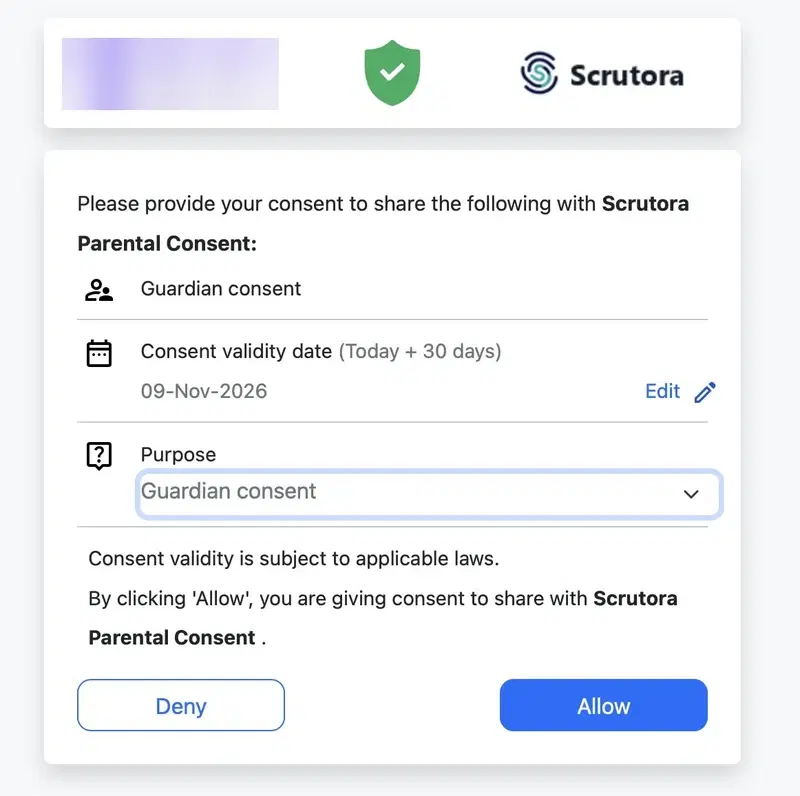
DigiLocker confirms an adult is signing
The parent signs in to DigiLocker and allows the request. DigiLocker returns a token tied to verified identity and age details. This is the Rule 10 route through an authorised entity.
Step 6
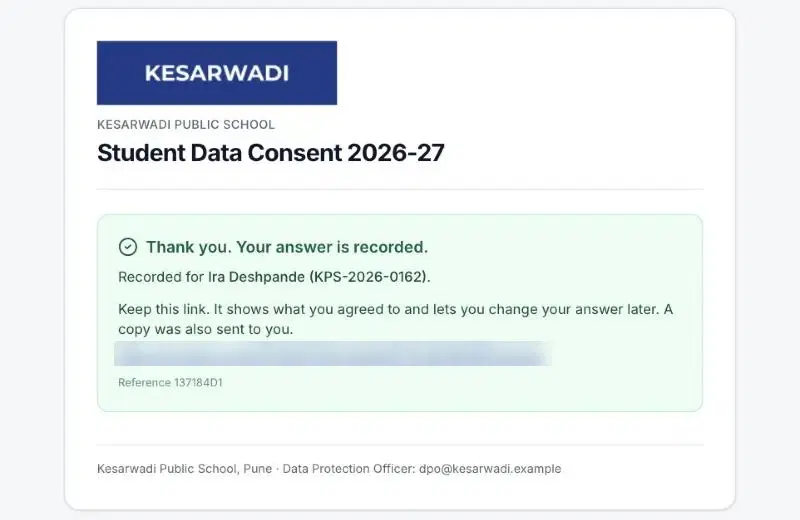
The answer is recorded for the child
Back on the form, the parent submits. The confirmation names the child it was recorded for. The parent gets a personal link to the receipt. A copy goes by email too.
Step 7
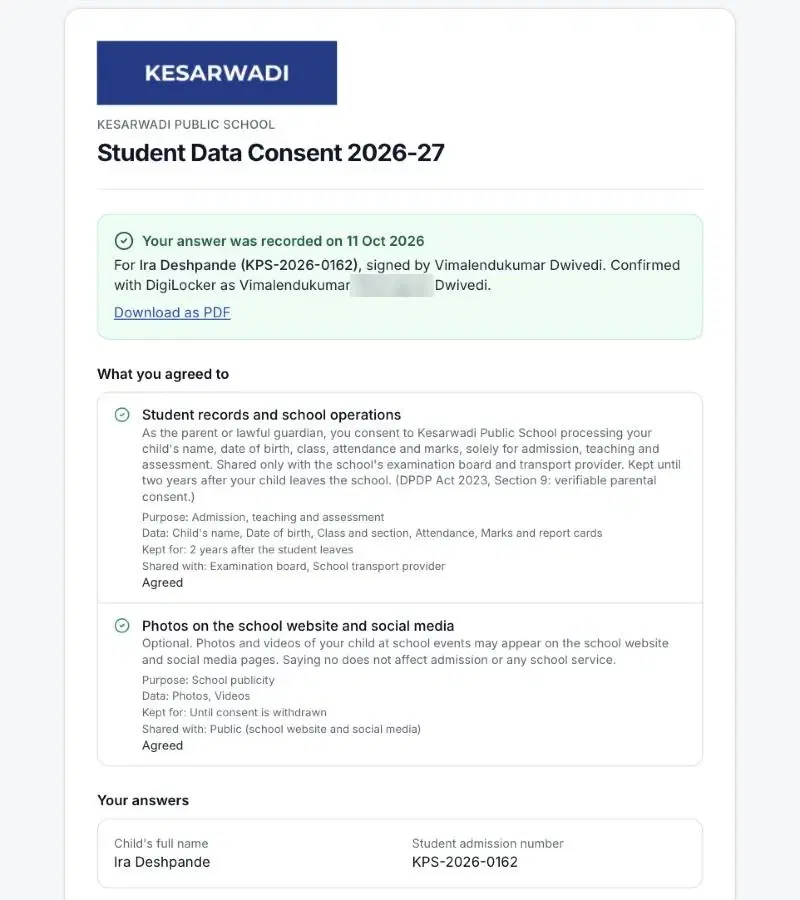
The receipt shows who, for whom, and how it was verified
The receipt is the parent's copy of the record. It shows the child, the signer and the name DigiLocker confirmed. It lists each purpose with its status. It can be downloaded as a PDF.
Step 8
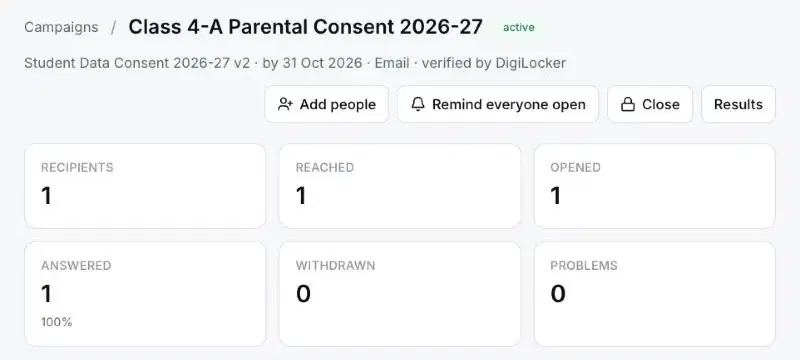
The school sees it, and the log holds it
The campaign dashboard updates. Recipients, reached, opened and answered are counted. The campaign header states “verified by DigiLocker”.
Each record is hashed with the one before it for the same person. If anyone edits or deletes a record, the chain breaks and “Verify the chain” shows it. That makes the log tamper-evident.
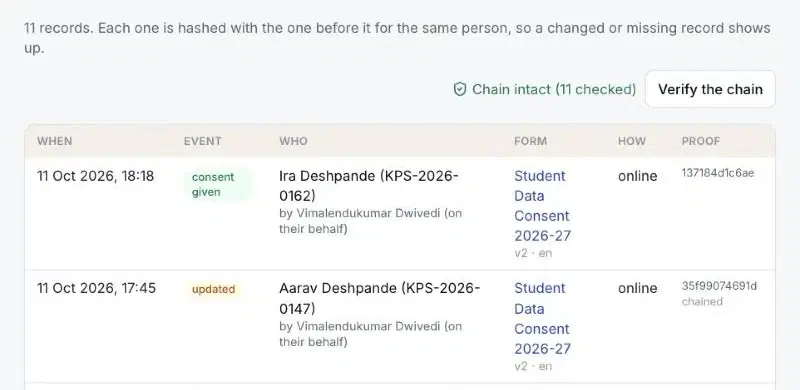
That is consent given, verified and on the record. Watch the whole flow here, including the withdrawal covered in part two:
Vimalendukumar Dwivedi is Co-founder of Scrutora, a Code Compliance Platform.
References: Digital Personal Data Protection Act, 2023 (India Code), sections 2(f), 6, 9 and 33, and the Schedule. Digital Personal Data Protection Rules, 2025 (Gazette of India, G.S.R. 846(E), 13 November 2025), rules 1 and 10 and the Fourth Schedule, Part A. This article explains how one product implements these provisions. It is not legal advice.
Run it on your own forms
Scrutora Consent Capture handles the form, the parent check, the receipt, withdrawal and the log in one flow.
Share this article